
AI
- Author
- Clovis de Bontin
- Published
- 7 October 2026
- Reading time
- 4 min read
Connecting ChatGPT and other AI models to Odoo agents
How my interaction with a billionaire turned into an opportunity for the Odoo community
All begins when I started to test the AI features of Odoo 20.0. The first thing I did was to create an agent, then, since I had a little bit of money left on my Claude account, I look for the option to connect the agent to my Claude account.
This is when I realized that not only this option is not available at the agent level anymore, it is not available at all. And you can't add your API keys anywhere to use credits from your AI provider accounts.
My first thought was that I was missing something. So I dug deeper, watched videos from the Odoo experience, but nothing. Supposedly, Odoo agents are supposed to work magically, and we don't know what's happening under the hood.
Still assuming that I was stupid enough to not see how to select the model, I wrote a post on LinkedIn, tagging Fabien Pinckaers (Odoo's CEO).
Interaction With Fabien On LinkedIn
That's the story of how a billionaire commented my post.
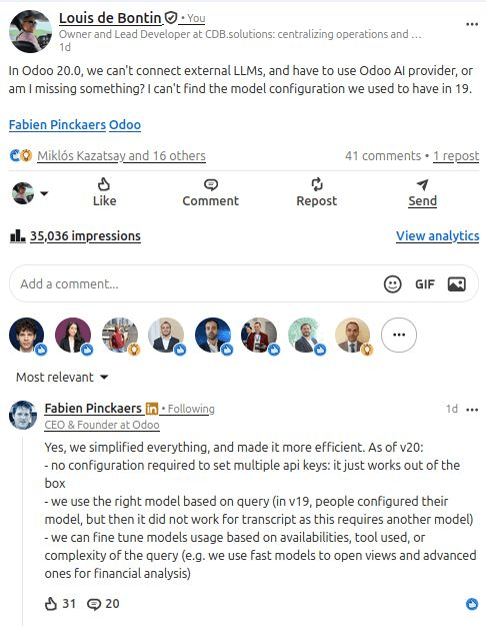
To Fabien's credit, a genuinely appreciated that he took the time to read my post and address my concerns very clearly. But, this wasn't the answer I was hoping to get. As you can see in the screenshot above, the selection of the model is indeed handled by Odoo under the hood. And to even be able to use any AI feature in Odoo, you have to buy credits. From Odoo!
The argument is that this is to "simplify everything". But, it's like putting someone in jail, and explained to him that his life is now "simplified", because he doesn't need to worry about food nor shelter anymore. Yeah, sure, life's simpler, but what about freedom?
Furthermore, among the 45 comments that the post generated, most of the people agreed that although their solution makes sense on paper, most of the users want to have the option to configure their own AI models.
People unhappy means opportunity.

Restoring The Connection To Any AI to Odoo Agents
So I got to work immediately. Or more specifically, I put Grok to work immediately. And I created... I mean, (sorry) Grok created on my command a module to return the selection of the model at the agent level. You can find the module on the Odoo App Store.
Although it's vibecoded, I took the time to thoroughly test it, and review the code in details.
Here is what it does:
- 01Providers for ChatGPT (OpenAI), Claude, Gemini, Grok, and DeepSeek, plus the possibility of adding any models that you like.
- 02Fetch models through a daily routine that will check if new models have been released. Or add and remove models yourself manually.
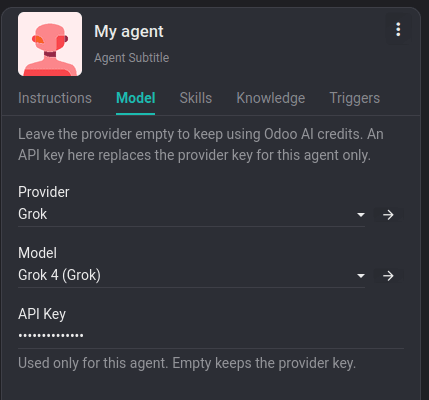
- 03A Model tab on the agent, with provider, model, and an optional API key for that agent only.
- 04Manage API keys at the model level, or the agent level for more flexibility.
- 05Odoo AI credits feature stays in place when no external model is set on the agent.
Conclusion
Kudos to Odoo for allowing this kind of open source initiatives, and maxi kudos to Fabien Pinckaers for commenting my post and engaging in the discussion.
But...! The people have spoken! And they want control and freedom over simplicity. Which is why I (Grok) re-created the feature to connect ChatGPT or any AI model to Odoo agents.
I sincerely hope this was helpful, and if you have any remark, suggestion or question, you can email me at louis@cdb.solutions or DM me on LinkedIn.
Thank you,
Clovis
Next step
See this in practice
Book a free demo. The technical partner for your country shows the apps that fit, at no charge.
Canonical URL: https://www.cdb.solutions/articles/odoo-ai-agents-custom-models
Next step
Book a free demo
Tell us the country and the operation. The technical partner for your country shows Odoo against your process, at no charge.
+33 7 69 45 83 27UK with SofthealerEverywhere else with AppNvent
Free demo
Put this against your own operation
Country, industry and company size. The technical partner scopes the work and holds the agreement.
Country chooses the partner. The UK is implemented with Softhealer. Everywhere else, with AppNvent.
The demo is specific. Industry and company size tell the technical partner which apps to show you.
No charge, no obligation. Scoping and any agreement come later, and only if you want them.