

Odoo.sh
- Author
- Clovis de Bontin
- Published
- 18 October 2026
- Reading time
- 11 min read
What an Odoo staging environment is on odoo.sh
What is an Odoo staging environment, why it matters, how is it different from production and development branches, how much odoo.sh hosting costs, and how does it compare with Odoo Online?
Imagine a restaurant chef crafting a recipe by swapping ingredients directly in the plates already in front of customers. That's exactly what you do when you test new modules or customizations directly in your live Odoo database. A good chef tries each new version of the recipe alone in the kitchen first. Then has the rest of the staff taste it, and only puts it on the menu once it's tested and approved. That's what an Odoo staging environment is for.
That is the problem an Odoo staging branches solves. On odoo.sh, the staging environment is a copy of your real database, where you can test, break and restore things without any consequences on your business operations.
In this article, I’ll explain what an Odoo staging environment is, why it matters, how it’s different from production and development branches, how much odoo.sh hosting costs, staging included, and how it compares with Odoo Online (hosting on odoo.com).
You don’t need to be a developer to follow this. Let’s get to it!
What Is odoo.sh (or Odoo SH)
Before going further, let’s clear up something that confuses a lot of people: Odoo has two completely different cloud hosting platforms. You pick one when you start your project, and you don’t jump back and forth between them depending on what you want to do.
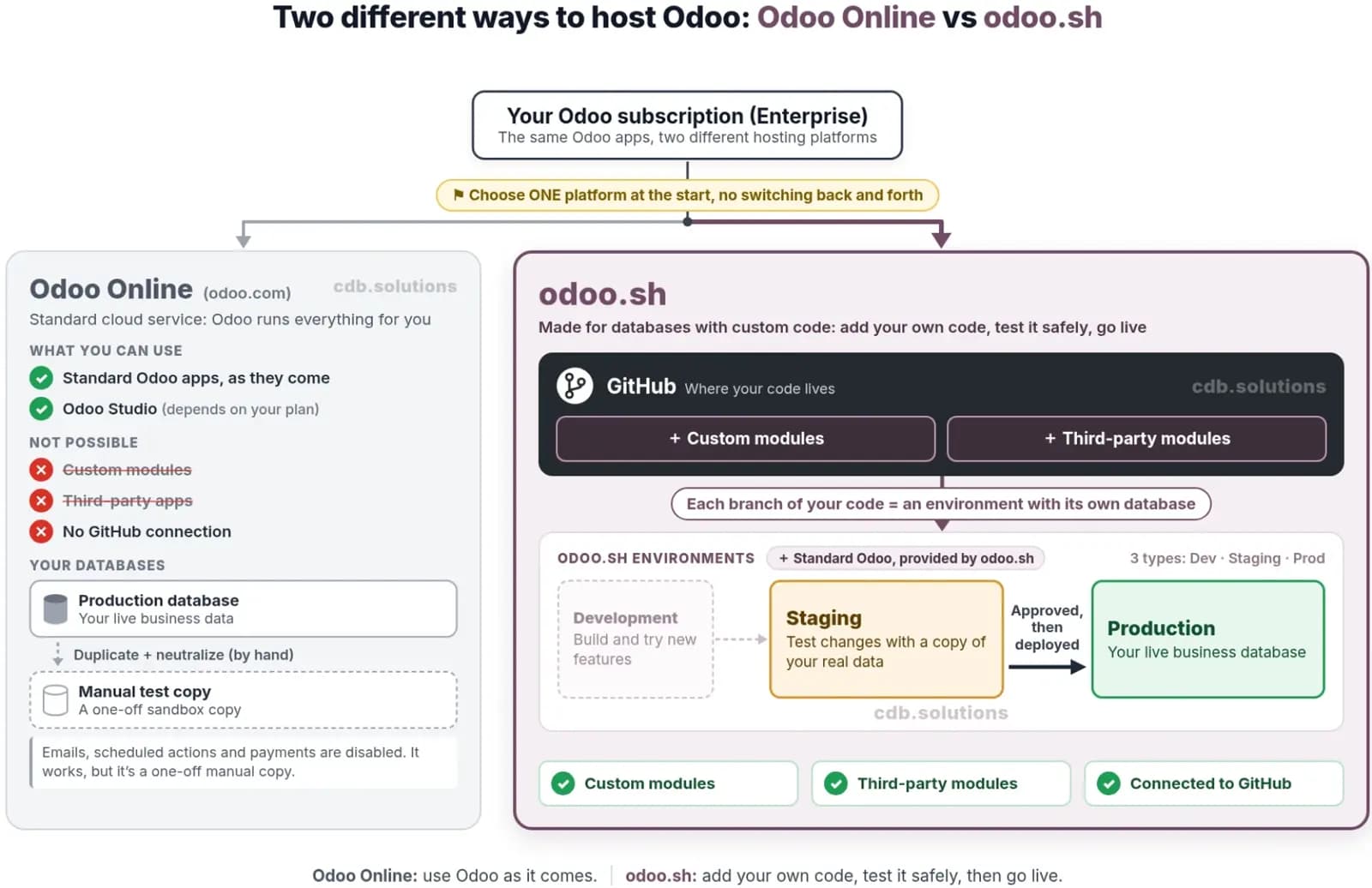
Odoo Onlineis the standard SaaS option. You subscribe on odoo.com, Odoo runs everything for you, and you use the apps as they come (plus Odoo Studio, if your subscription tier allows it). You can’t install your own custom modules or third-party apps. You can duplicate your database from the database manager which will create a neutralized copy if you need to test stuff around. Which gives you a sandbox where emails, scheduled actions and payments will be disabled. It works, but it’s a manual, one-off copy.
odoo.sh is the other platform, made for databases with custom code. It’s connected to GitHub, and every branch of your code repository becomes an environment with its own database. And Odoo SH offer 3 types of environment that we will see in the next section.
Note: according to the Odoo pricing page, hosting on odoo.sh requires the “Custom” plan.
Production, Staging And Development
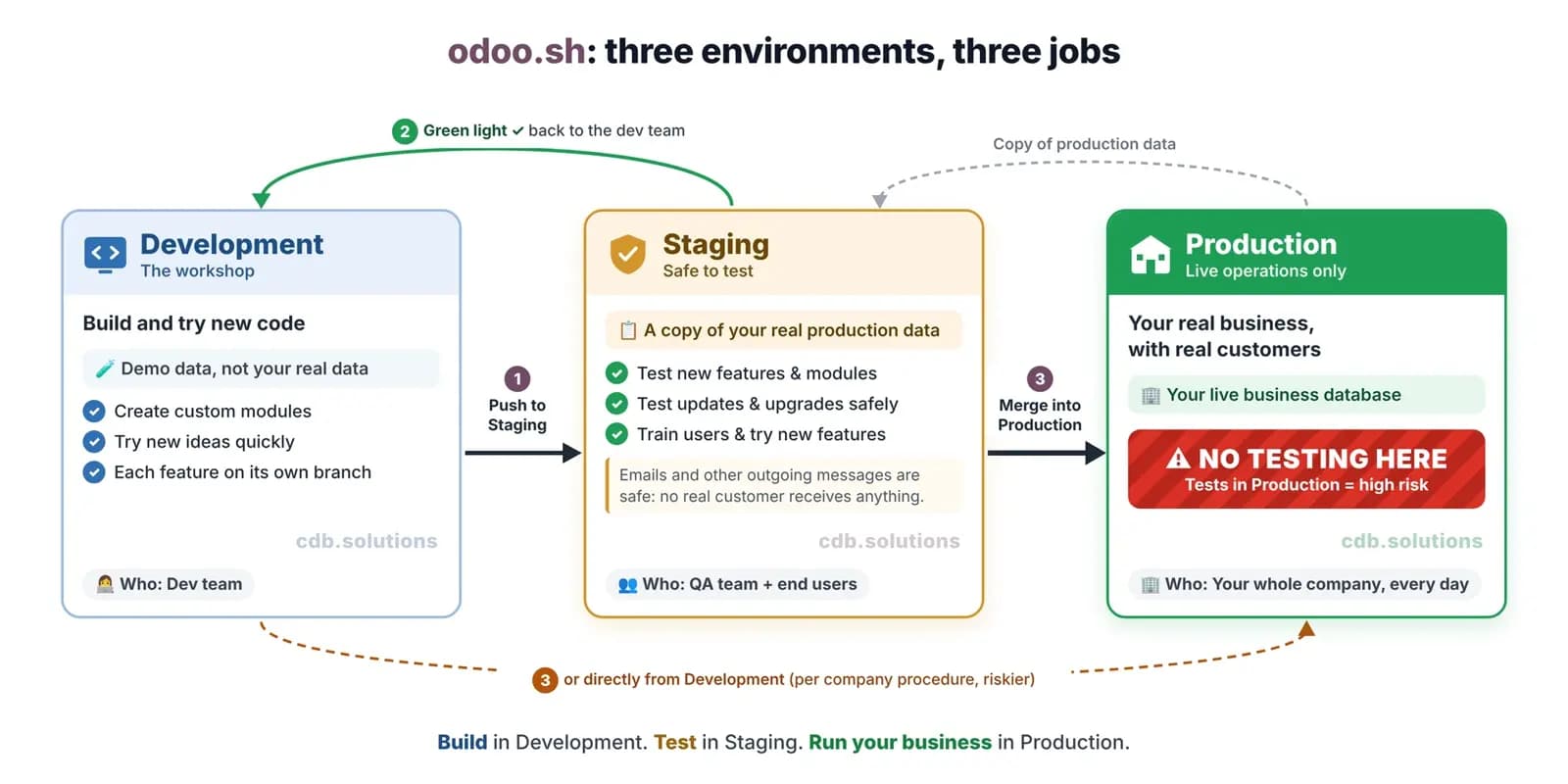
odoo.sh has three environment types: Production, Staging and Development. You move a branch from one stage to another by dragging and dropping it. Here is what each one does, based on the official odoo.sh branches documentation.
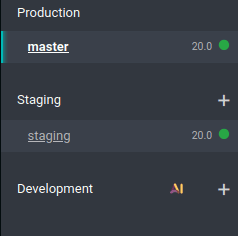
Production: The Real Thing
This is your live database: real customers, real invoices, real emails. There can be only one production branch. odoo.sh automatically keeps seven daily, four weekly and three monthly backups of it.
Staging: The Sandbox
The staging branch runs your code against a copy of your production data. It’s a “neutralized” duplicate, meaning Odoo switches off everything that could touch the outside world:
- Scheduled actions are disabled (they can be re-activated if you need them in staging)
- Outgoing emails are caught by a mail catcher (your customers will not receive them, and you can still read them in the “Mails” tab of odoo.sh)
- IAP services are disabled
- Payment providers and shipping connectors are put in test mode
So you can confirm a hundred fake sales orders, and nobody gets a single email. Awesome!
Development: The Workshop
Development branches don’t use your data at all. They create a fresh database with demo data and run the automated tests every time a developer pushes code. They’re meant to last roughly three days, and then they can be deleted without notice. These are rarely used by anyone else than the developers.
Summary Table
| Production | Staging | Development | |
|---|---|---|---|
| Data | Your real data | Copy of production data | Demo data |
| How many | Only one | Several (you pay per staging environment) | Unlimited |
| Emails | Really sent | Caught by the mail catcher | Caught by the mail catcher |
| Scheduled actions | Active | Disabled (can be re-activated) | Demo data, no scheduled actions by default |
| Automatic backups | Yes | No (manual backups possible) | No |
| Lifespan | Permanent | Database deleted after 1 month (can be extended) | About 3 days |
Odoo staging environment mail catcher in the mails tab Emails sent from staging land in the mail catcher, not in your customers’ inboxes.
Why An Odoo Staging Environment Matters
Here's some risk you expose yourself to when testing directly in production:
- Deleting a PDF template your invoices, sales, purchases, etc. depend on
- Sending a "test" email to 2,000 real customers
- Deploying a custom module that wipes or corrupts data on install.
- Messing up your accounting, inventory, or any other crucial aspect of your business you're tracking
- Disrupting normal Odoo operations for your teams
- Routines communicating test data to 3rd party apps and SaaS
- All that good stuff you absolutely need to avoid.
These reasons are examples of reasons why the Odoo staging branch environment exists. It has three main purposes.
1- Test New Features, Modules And Customizations Before Production
Your developer has built a custom module, or you want to install an app from the Odoo App Store or from OCA or any other 3rd party. Before it reaches production, it goes to staging, where it’s tested with your real data: your products, your customers, your actual workflows, etc.
Demo data are good for development and demo. But custom work needs a real trial by fire. And that's with your own data.
Once everything is validated, the staging branch is merged into production by your development team (⚠️ don't do it yourself if you don't know what you're doing). Odoo’s documentation is clear that you can merge a development branch straight into production, but then nothing has been checked against production data, so the risk of problems is higher.
2- Test Updates Safely
The same logic applies when you update your modules or move to a new Odoo version. Load a production backup in staging, run the update, test all your workflows, and only then apply them to production.
Tips: you can restore a production backup into a staging branch at any time by rebuilding it. It’s also a handy way to recover data someone deleted by accident in production.
3- A Sandbox For User Training And Trying New Features
Staging is also a great training room. New employees can create quotations, validate deliveries and post fake invoices with realistic data, and no real customer receives anything.
Since staging is a copy of the production database the configuration is already done! So there is almost no setup required to start training them on realistic data.
And it’s the perfect place for you to just try things. Curious about a new feature of Odoo 20.0? Turn it on in staging, play with it, and decide if your business needs it in production.
Limitations Of The Odoo Staging Branch
Staging isn’t perfect, and you should know its limits:
- It doesn’t last forever. Staging databases are automatically deleted after one month. Painful when your customer takes six weeks to do their QA. Good news: I wrote a guide to rebuild a staging database without losing data and extend its lifespan.
- It’s slower. According to the odoo.sh FAQ(and my personal experience as well), staging and development builds are limited to a single worker. So don’t judge production performance from staging.
- No automatic backups. You can make manual backups of staging, but odoo.sh does not back it up automatically.
- Scheduled actions are off. If you’re testing an automation that runs on a schedule, trigger it manually or re-enable it.
Odoo Hosting Price: How Much Does odoo.sh Cost?
Now let’s talk about money, because the Odoo SH pricing is often misunderstood. On Odoo, you pay 2or 3 separate things:
- 01The Odoo Enterprise licence, per user. odoo.sh requires the “Custom” plan. At the time of writing, the Odoo pricing page lists it at US$32.00 per user/month billed yearly, or US$40.00 billed monthly, with an introductory discount for the first 12 months. The page also says clearly: “Cost for Odoo.sh hosting not included.”. This price depends on your country. This price is for Tier 1 countries (Europe, North America and most of Western countries are in this tier, check the Odoo pricing page to see your accurate pricing).
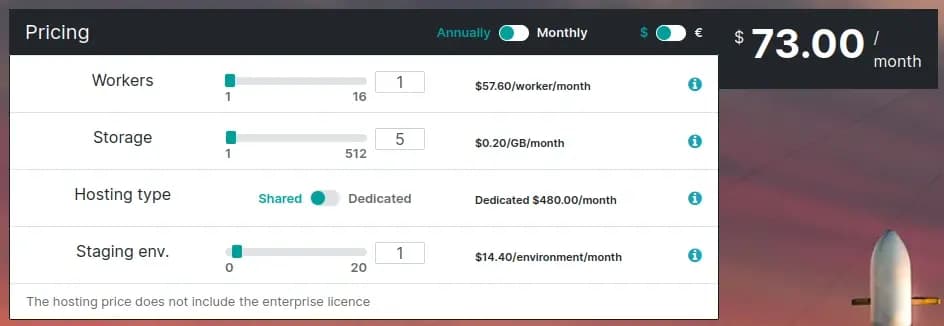
- 02The hosting. On odoo.sh, the hosting price depends on the resources you choose on the odoo.sh pricing calculator (see table bellow).
- 03Your integrator (Odoo Partner) if you have one.
Here are the odoo.sh unit prices in USD shown by the calculator on October 16, 2026:
| Resource | Monthly billing | Yearly billing (20% less) |
|---|---|---|
| Worker | $72.00 / worker / month | $57.60 / worker / month |
| Storage | $0.25 / GB / month | $0.20 / GB / month |
| Staging environment | $18.00 / environment / month | $14.40 / environment / month |
| Dedicated hosting (Instead of shared. Only required for very heavy databases) | $600.00 / month | $480.00 / month |
On shared hosting, you can pick between 1 and 16 workers and up to 512 GB of storage. Beyond that, you have to go dedicated. Each staging environment costs extra, and you can add up to 20. The calculator starts at 0 staging environments, so staging isn’t included by default. Development branches, on the other hand, are unlimited and included.
So a small project with 1 worker, 5 GB of storage and 1 staging environment, billed yearly, comes to $57.60 + $1.00 + $14.40 = $73,00/month for hosting, before user licenses.
Note: prices vary by currency and region, and Odoo changes them from time to time. Always check the odoo.sh pricing page before you budget.
My opinion? One staging environment is the bare minimum for any serious odoo.sh project. For about $14.40 a month, it’s the cheapest insurance you’ll ever buy.
Conclusion
That’s it for the staging environment on Odoo SH! In short, the Odoo staging branch is a testing sandbox: a neutralized copy of production where you test new modules, customizations and updates, train your users and try new features without risk.
If you’re planning an Odoo project and aren’t sure how many workers or staging environments you need, you can book a demo with me.
I sincerely hope this was helpful, and if you have any remark, suggestion or question, you can email me at louis@cdb.solutions or DM me on LinkedIn.
Thank you,
Clovis
Next step
See this in practice
Book a free demo. The technical partner for your country shows the apps that fit, at no charge.
Canonical URL: https://www.cdb.solutions/articles/odoo-staging-environment
FAQ
FAQ
The questions buyers ask most, answered here. If yours is not covered, ask us directly.
01Is an Odoo staging environment available on Odoo Online?
02Do changes in staging go to production automatically?
03Will my customers receive emails from staging?
04How long does an Odoo staging branch last?
Next step
Book a free demo
Tell us the country and the operation. The technical partner for your country shows Odoo against your process, at no charge.
+33 7 69 45 83 27UK with SofthealerEverywhere else with AppNvent
Free demo
Put this against your own operation
Country, industry and company size. The technical partner scopes the work and holds the agreement.
Country chooses the partner. The UK is implemented with Softhealer. Everywhere else, with AppNvent.
The demo is specific. Industry and company size tell the technical partner which apps to show you.
No charge, no obligation. Scoping and any agreement come later, and only if you want them.